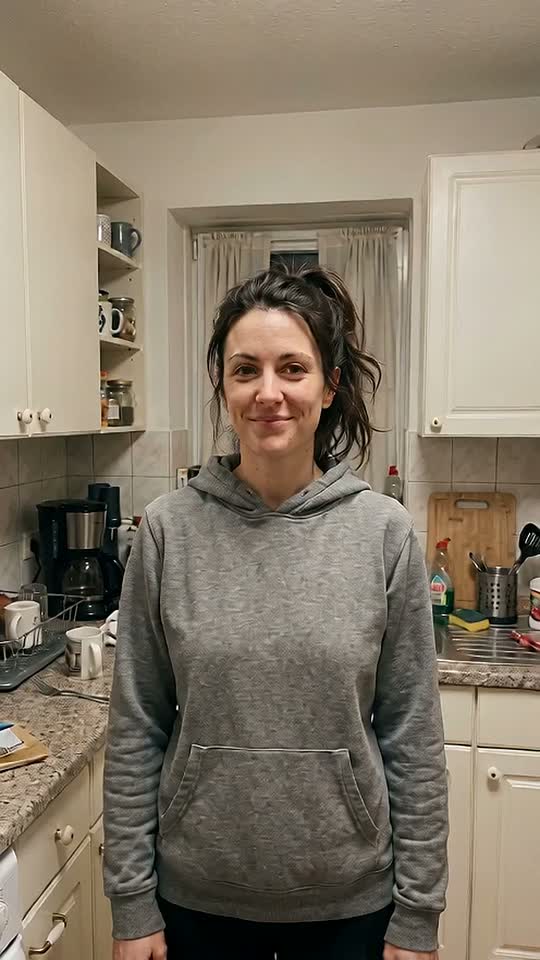




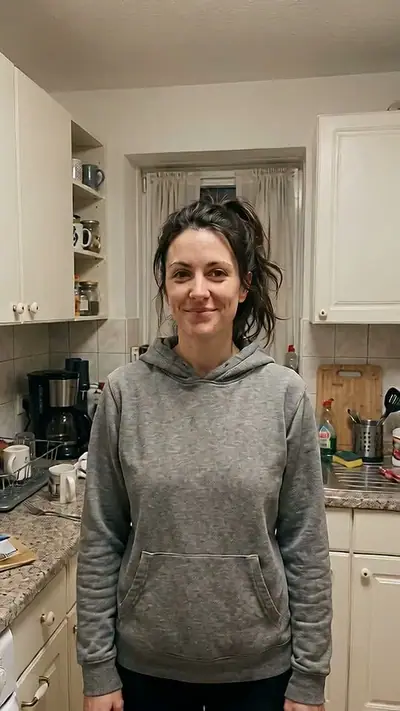
Cinematic Makeover AI example: a smiling woman with a messy dark ponytail in a grey hoodie stands in a cluttered kitchen
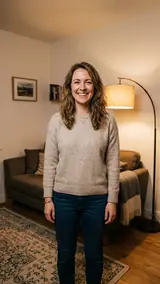
The photo used for this example: a smiling woman with a messy dark ponytail in a grey hoodie stands by kitchen cabinets

scenes

Cinematic Makeover AI: Turn One Photo Into a Film Scene

Upload one ordinary photo. Get a 10-second vertical video: you snap your fingers and become a film-lit movie scene, with sound.

10 s9:16HD 720pWith soundOne adult, face visible: you or a friend who agreed.$4.99 for one video

Your photo

Acceptable use

Make my video · $4.99

Ready in 3–6 min · Stripe or PayPal checkout · Failed video = credits back · 7-day upload deletion

30 credits ≈ 1 video · $4.99 for one video, from $2.40 with a pack

Updated

Cinematic Makeover AI video examples

To make a Cinematic Makeover AI video, upload the required photos: One adult, face visible: you or a friend who agreed. Confirm photo rights and adult age, and pay. In about 3–6 minutes you get an MP4, 10 s at 720p, 9:16. Model-generated sound. One video costs $4.99. Upload first, then sign in at Make. Your credits belong to your account email. A video that fails gives its credit back.

The example starts from one plain photo: an adult in a grey hoodie in a home kitchen under a flat ceiling light. After the snap, she keeps her face. Her hair is pinned up, she wears a dark tailored top, and warm side light with a golden rim fills the shot. The camera pushes in to a close-up. The AI model made the sound.

Generated

What is the Cinematic Makeover trend?

On TikTok and Instagram, creators tag AI before-and-after reveals as a cinematic makeover. One July 2026 example shows a fruit character at a spa who walks out as a glamorous star. Most clips show a plain start and a polished, film-lit end.

The format works because the change is easy to read in one second: a plain start, a snap, then a film still. Our version makes that reveal from your own photo. It does not copy any real film, director or actor.

Seen · View source

How to make a Cinematic Makeover AI video in 3 steps

  1. 1. Add one ordinary photo

    Add one clear photo of yourself, or of a friend who agreed to be in the clip. Show one adult with the face turned to the camera. Everyday clothes and a normal room are best, because the plain start makes the reveal stronger.

    Photo needed: One adult, face visible: you or a friend who agreed.

  2. 2. Check the example and pay

    Play the example to see the snap and the change. Then confirm that you are 18 or older and that the person in the photo agreed. Check the cost in the tool, sign in at Make and pay for one video. Packs start at $4.99.

  3. 3. Wait and download

    Your 10-second clip takes 3–6 minutes. You can close the page. We email your private link when the clip is done. Open it, watch the reveal and download the video.

Read the full Cinematic Makeover guide

What you upload and what you get

You upload

One adult, face visible: you or a friend who agreed.

Upload one photo of one adult. It can be you, or a friend who agreed to be in the clip. Show the face clearly, facing the camera, from the waist up. Any outfit and any room are fine, because the scene restyles both. Photos of a celebrity, of a young person or of a person who did not agree are not allowed.

Use JPG, PNG, WebP, HEIC, up to 30 MB. Photos are resized before upload. You can swap the picture before you start. You must be 18 or older. Confirm photo rights and adult age. We delete uploads after 7 days and never use them to train models.
You get

MP4, 720p, 9:16, 10 s. Model-generated sound.

You get a 10-second vertical MP4 in 9:16 at 720p, with sound. The first seconds look like your photo: your clothes, your room, plain light. After a snap of your fingers, your hair is styled and you wear a dark tailored outfit. Warm side light, soft film grain and a teal and amber grade turn the shot into a film scene. The camera moves in to a close-up.

This effect uses 30 credits for one video. Pack pricing starts from $2.40 per video. Pack credits never expire. Compare packs before buying more credits.

Photo tips for a better Cinematic Makeover video

A good input makes the subject easier to read. Open the photo at its original size and check the important details before uploading. A bright, sharp photo is more useful than a heavily edited one. Match the crop to the effect: a face-focused scene and a routine with full-body steps need different framing.

  • Show one adult, with the face turned to the camera.
  • A waist-up photo works best for the outfit change and the close-up.
  • Take off sunglasses, hats and masks, so the face is easy to keep.
  • Use a sharp photo. Do not use a screenshot or a heavy filter.

What can go wrong with a Cinematic Makeover AI video

The face drifts from your photo

The new light and the close-up change how a face looks. The result can look close to you but not exact. Use a sharp, front-facing photo in even light, and check the clip before you share it.

Your room stays in the shot

The model often keeps your own background and relights it like a film set. Clutter behind you can stay visible in the after shot. For a cleaner scene, pick a photo with a plain wall behind you.

A generation that fails returns its credits automatically. If a delivered video has distorted details, email support@effectfarm.com with its link for review.

Cinematic Makeover AI video ideas

Use these as starting points for your photo and for the finished clip. They are ways to use the effect, not extra controls. The template sets the movement.

Your own before-and-after reveal

Pick your most ordinary photo: a hoodie, a messy ponytail, kitchen light. The plainer the start, the bigger the jump to the film look. Post the clip as it is, or put your original photo in front of it so people see the full change.

A main-character moment for a friend

Ask a friend first, then use a clear photo of their face. They snap their fingers and turn into the lead of a film, with warm light and a slow push-in. Send it on their birthday or after a big week.

The last shot of your edit

Put the clip at the end of a vlog or a photo dump. The first seconds match a normal phone video, so the cut feels natural. Then the light drops, the grade warms up and the camera moves in. The video has no text, so you can add your own caption.

A dramatic two-part story

Pair the reveal with a second scene for a short story. Use the same photo in both clips, so the face stays the same. A close portrait that works here also works for an emotional close-up.

Explore this effect

Cinematic Makeover AI FAQ

How do I follow the Cinematic Makeover tutorial?
Use one clear photo of one adult, facing the camera, from the waist up. Everyday clothes are fine. Then follow the three steps on this page: add the photo, confirm your age and consent, and pay for one video.
Why is the Cinematic Makeover on TikTok?
Before-and-after reveals are easy to watch and easy to copy. Creators tag AI makeover clips with a plain start and a film-lit end as a cinematic makeover. Our version makes that reveal from your own photo.
Where can I see the original Cinematic Makeover video?
The first post is not verified. Many creators use the name for different AI reveals. One example post is the source link in the trend section, with credit.
What happens in the Cinematic Makeover meme?
You start as in your photo: your clothes, your room, plain light. You snap your fingers. Then your hair is styled and you wear a dark tailored outfit. Warm side light and film grain turn the shot into a film scene while the camera moves in.
Will the face look like my photo?
It should look close to your photo, but it is not exact. The new light and the close-up change how a face looks. A sharp, front-facing photo in even light gives the closest result.
Can I pick a film style or a famous look?
No. This scene has one look: styled hair, a dark tailored outfit, warm side light, film grain and a teal and amber grade. It does not copy a real film, director or actor. Do not upload photos of famous people.
How long is the video, and does it have sound?
It is 10 seconds long, vertical 9:16, at 720p, as an MP4 file. Yes, it has sound. The AI model makes the sound for each video, so it can differ from the example.
How much does a Cinematic Makeover AI video cost?
30 credits ≈ 1 video. Packs start at $4.99, and pack credits never expire. Monthly plans are optional. You buy a pack after you sign in at Make with Google or an email code. If a video fails, its credits come back.
How long until my video is ready?
Usually 3–6 minutes. You can close the page while it is made, and we email a private link when it is ready. We delete uploaded photos within 7 days.

More viral AI video trends

Compare another movement or scene before you choose your next video. Each effect has its own sample, photo needs, length and credit cost.

Put your photo in motion

Snap your fingers and turn your plainest photo into a film scene.

Make my video

No subscription needed. Pack credits never expire.