








Santa Caught on Camera AI Video Generator

Make a Santa Caught on Camera AI video from one photo of your room. Santa sneaks in on a home-camera clip, leaves gifts and waves.

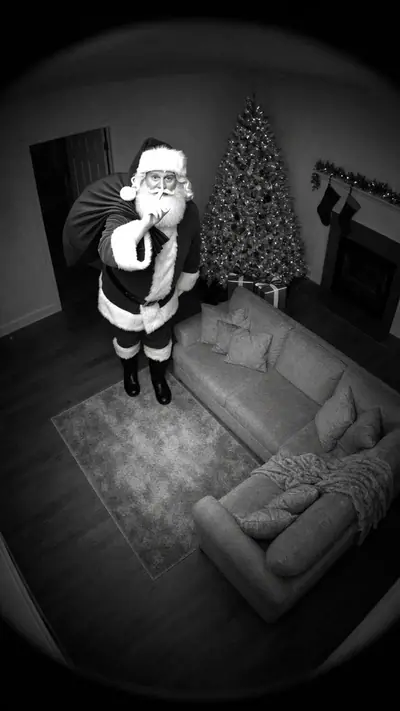
Santa Caught on Camera AI example: black-and-white home camera: Santa leaves gifts under the tree, finger to his lips
Santa Caught on Camera AI

10 s · 9:16 · 1 clear photo

30 credits
2

Add your photo

Upload a photo

Good
photo
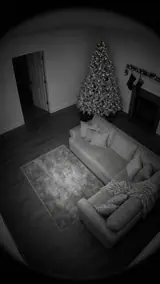
The photo used for this example: a black-and-white high-corner view of an empty living room with a lit tree
Variant

or $2.49 with a 12-video pack →

Pay only when you press Make · Stripe or PayPal · Failed video = credits back

By uploading a photo you confirm you're 18+ and own it. · Rules

Santa Caught on Camera AI example: black-and-white home camera: Santa leaves gifts under the tree, finger to his lips
▶ Real result10 s · 9:16

Santa Caught on Camera AI

1 clear photo → 10 s 9:16 HD video, ready in about 3–6 min

30 credits

The short answer

Effect Farm makes Santa Caught on Camera AI from 1 photo. Make a Santa Caught on Camera AI video from one photo of your room. Santa sneaks in on a home-camera clip, leaves gifts and waves. You get 10 s at 720p, 9:16, MP4. Model-generated sound. One video costs $9.99. Watch the samples and see your price before you pay. No sign-up needed: pay as a guest with card or PayPal. Usually ready in 3–6 minutes. A failed video returns its credits.

Santa Caught on Camera AI video examples

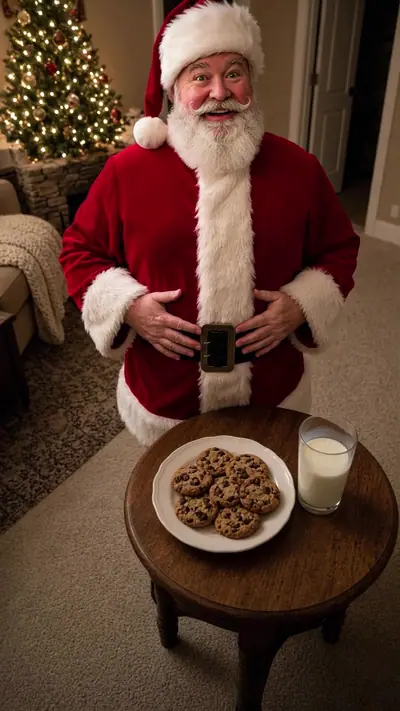
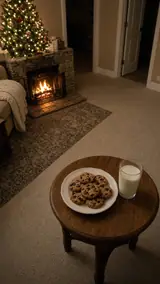
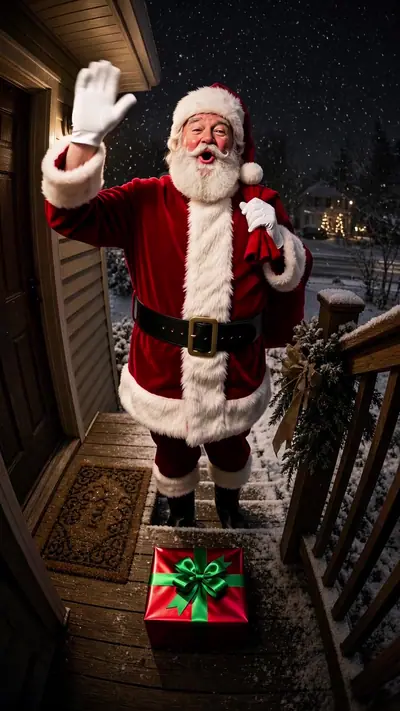
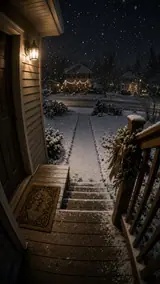
Each example pairs the empty room photo with its finished clip. In Night Vision, Santa walks into a living room with his sack, kneels to leave two gifts under the tree, looks up with a finger to his lips and tiptoes out. In Cookie Thief, he eats a cookie by the fireplace, sips the milk, pats his belly and waves. In Doorbell, he climbs snowy steps, says "Ho ho ho, Merry Christmas!", waves and leaves a present by the door. Night Vision is almost silent.

Generated

Simple, honest pricing

Every video is paid. One video = 30 credits on every effect. Packs make each video cheaper.

Full pricing & refunds →

Single video

$9.99
30 credits · $9.99/video
  • Any effect
  • HD 720p MP4
Make 1 video

Starter

$14.90
100 credits · $4.47/video
  • 3 videos + 10 spare credits
  • Credits never expire
Get 100 credits

Creator

$29.90
360 credits · $2.49/video
  • 12 videos
  • Credits never expire
Get 360 credits

Studio

$79.90
1260 credits · $1.90/video
  • 42 videos
  • Credits never expire
Get 1260 credits

$199.00
4200 credits · $1.42/video
  • 140 videos
  • Credits never expire
Get 4200 credits
Watch the samples, see your price, then pay. No subscription. Pricing from $1.42 per video. A failed or blocked video returns its credits automatically. Unused credits can be refunded within 14 days.

Who runs Effect Farm

  • Run by Effect Farm Team, an independent online service.
  • Support: support@effectfarm.com or live chat. We reply within 2 business days.
  • Payments by Stripe and PayPal. You can pay as a guest.
  • Every paid video: 1 remake within 7 days, any reason. Refund policy

Updated

More about Santa Caught on Camera

What is the Santa Caught on Camera trend?

Every December, parents post home-camera and doorbell clips that seem to show Santa leaving gifts, as proof that he came. AI tools now build that scene from one photo of a room. Effect Farm is independent and not affiliated with a camera maker or app.

The joke works because the room is real. Viewers know the sofa, the tree and the front door, so a visitor in a red suit looks like a true recording. Your video keeps your room as it is and adds one generated adult figure, Santa.

Seen · View source

How to make a Santa Caught on Camera AI video in 3 steps

  1. 1. Add one photo of your room

    Take one photo of a room or porch of your own home, from a high corner or from doorbell height, with the floor visible. Nobody should be in the picture. Add it in the tool. You do not write a prompt.

    Photo needed: One photo of a room or porch of your home, with no people in it

  2. 2. Pick a style and pay

    Choose Night Vision, Cookie Thief or Doorbell. Check the example and see the price before generation. You must be 18 or older to buy. Pay for one video as a guest.

  3. 3. Wait for the email link

    The AI builds your 10-second home recording in a few minutes. You can close the page; the private link arrives by email. Open it, watch from the start and download the MP4.

Read the full Santa Caught on Camera guide

What you upload and what you get

You upload

One photo of a room or porch of your home, with no people in it

Upload one photo of a room or porch of your own home: the living room, the kitchen, the fireplace corner or the front door. Take it from a high corner or from doorbell height, with the floor visible. The photo must show no people. Never upload a photo of a person under 18; the clip shows only Santa and your room.

Use JPG, PNG, WebP, HEIC, up to 30 MB. Photos are resized before upload. You can swap the picture before you start. You must be 18 or older. Confirm photo rights, adult age and consent, and pet ownership. We delete uploads after 7 days and never use them to train models.

You get

MP4, 720p, 9:16, 10 s. Model-generated sound.

You get a 10-second MP4, 720p, 9:16 vertical, styled like a home security recording. Night Vision is black and white: Santa leaves gifts under the tree, puts a finger to his lips and tiptoes out. Cookie Thief is in colour: he eats a cookie, sips the milk, pats his belly and waves. Doorbell is a wide fisheye view of the porch: he sets a present down by the door and waves. The sound is generated with the video and stays low.

This effect uses 30 credits for one video. Pack pricing starts from $1.42 per video. Pack credits never expire. Compare packs before buying more credits.

Photo tips for a better Santa Caught on Camera video

A good input makes the subject easier to read. Open the photo at its original size and check the important details before uploading. A bright, sharp photo is more useful than a heavily edited one. Match the crop to the effect: a face-focused scene and a routine with full-body steps need different framing.

  • Take the photo of the whole room from a corner, like a real security lens would.
  • Turn on the tree lights and keep the room evenly lit.
  • Leave space on the floor where Santa can walk.
  • Keep people out of the photo.
  • For Doorbell, stand where your doorbell is and include the steps and the mat.
  • For Cookie Thief, put a plate of cookies and a glass of milk in view.

What can go wrong with a Santa Caught on Camera AI video

A person is in the photo

The effect is made for an empty room. If a person is in the picture, the model may move or change them. Take the photo again with nobody in the frame. Photos that show a person under 18 are not allowed.

Small objects shift

The model redraws your room in every frame, so ornaments, small objects or the words on a doormat can blur or move a little, and the view can sit closer than your photo. In our three samples the furniture and the layout stay in place.

No tree or no cookies in the photo

Night Vision places gifts under a tree and Cookie Thief reaches for a plate of cookies. Our samples start from photos that show them. We have not tested rooms without a tree or a plate, so include them in your photo.

The sound differs between clips

The sound is generated with the video. Our Night Vision sample is almost silent, Cookie Thief has a low murmur without clear words, and in the Doorbell sample Santa says a short greeting. He cannot say a name.

A generation that fails returns its credits automatically. Not happy with a delivered video? It includes 1 remake within 7 days, or write to support@effectfarm.com.

Santa Caught on Camera AI video ideas

Use these as starting points for your photo and for the finished clip. They are ways to use the effect, not extra controls. The template sets the movement.

A Christmas Eve surprise for the family

Make the clip in advance and play it on Christmas morning as proof that Santa came to your house. Night Vision looks like a motion alert from a living-room lens: black and white, a little grainy, with a finger to the lips at the end. Use the room where the tree stands, so everybody knows the place at once.

A greeting for the group chat or the neighbors

Send the Cookie Thief clip to friends or relatives as a short holiday hello: Santa eats a cookie, sips the milk and waves. For the street chat, take a photo of your porch from doorbell height and pick Doorbell. Label the clip as AI when you post it.

Hotel Lobby AI

Start the season at Thanksgiving

Pair this clip with a November one: our Thanksgiving effect uses a photo of you or your pet.

Turkey Dance AI

More holiday scenes from one photo

The Halloween scenes work the same way with a photo of you: one picture in, one short vertical video out.

More holiday scenes from one photo

Make my video · $9.99

Santa Caught on Camera AI FAQ

Is it free?
You can watch the samples and see your price before you pay, with no sign-up. Each video you make is paid: one video costs $9.99. Pack credits never expire.
Do I need to sign up?
No. Pay as a guest with card or PayPal. Upload without an account and see the price before generation. Your payment provider collects your email. Sign-in is optional. Keep your private order and wallet links to return to your videos and credits.
What if my video fails? Can I get a refund?
A failed video returns its credits to your wallet automatically. This is a credit return, not an automatic cash refund. For unused-credit refunds, email support@effectfarm.com from your checkout email within 14 days of purchase.
How do I follow the Santa Caught on Camera tutorial?
Upload one photo of your living room, kitchen or front door, pick Night Vision, Cookie Thief or Doorbell, and pay for one video. Then follow the three steps below the tool. The clip is usually ready in 3–6 minutes.
What is a Santa Caught on Camera AI video?
A 10-second vertical clip in a home security style, built from one photo of your room. Santa walks in, leaves presents and notices the lens.
Why is Santa Caught on Camera on TikTok?
Every December, parents post home recordings that seem to show Santa leaving gifts, as proof that he came. The tag page in the source section collects those clips.
Where can I see the original Santa Caught on Camera video?
There is no single original clip. Home recordings like this return every December. The source section links to the TikTok tag page, and the examples on this page show the three versions we generate.
What happens in the Santa Caught on Camera meme?
A fixed home lens shows a quiet room at night. A visitor in a red suit walks in, leaves gifts or eats the cookies, notices he is being filmed, then waves or puts a finger to his lips and leaves.
Can I use a photo of my own living room?
Yes, that is the point. Your room stays as it is and Santa walks into it. Use a photo with nobody in it.
Does it look like a real security or doorbell camera?
Night Vision gives a black-and-white infrared look, Doorbell gives a wide fisheye porch view, and Cookie Thief keeps full colour from a high indoor angle.
Is the Santa video real?
No. It is an AI-made clip based on your photo. Label it as AI when you post it.
Can I show it to my family?
Yes. The clip shows only Santa and your room. Please do not upload photos with people in them, and never a photo of a person under 18.
How long is the video?
10 seconds, 720p, 9:16 vertical MP4 with sound.

More effects

Compare the sample, photo requirements and output before choosing another effect.

Put your photo in motion

Add one photo of your room, pick Night Vision, Cookie Thief or Doorbell, and catch Santa on your own home recording.

Make my video · $9.99

No subscription needed. Pack credits never expire.