Pay only when you press Make · Stripe or PayPal · Failed video = credits back
By uploading a photo you confirm you're 18+ and own it. · Rules
▶ Real result10 s · 9:16
AI Snow Globe Video
1 clear photo → 10 s 9:16 HD video, ready in about 3–6 min
30 credits
The short answer
Turn one photo of an adult, an adult couple, or a pet into a 10-second snow globe video. The subject appears inside a glass snow globe scene, with generated sound. The finished clip is a 720p vertical (9:16) MP4, sent on a private email link. Every generation is paid, including the first. Guest checkout is available; sign-in is optional.
Effect Farm makes AI Snow Globe Video from 1 photo. Make an AI snow globe video from one photo of you, an adult couple or your pet. A 10-second vertical Christmas clip with sound. You get 10 s at 720p, 9:16, MP4. Model-generated sound. One video costs $9.99. Watch the samples and see your price before you pay. No sign-up needed: pay as a guest with card or PayPal. Usually ready in 3–6 minutes. A failed video returns its credits.
Snow Globe AI video examples
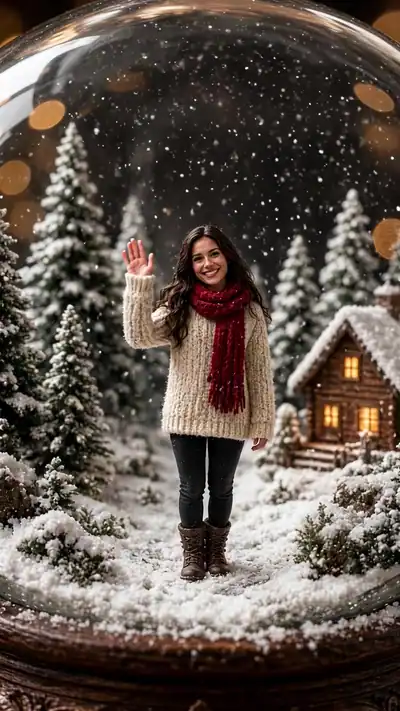
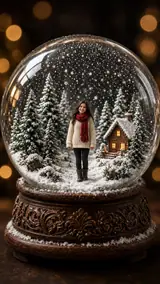
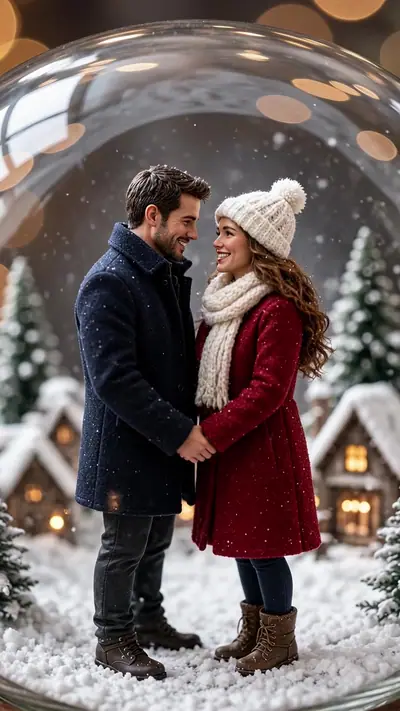
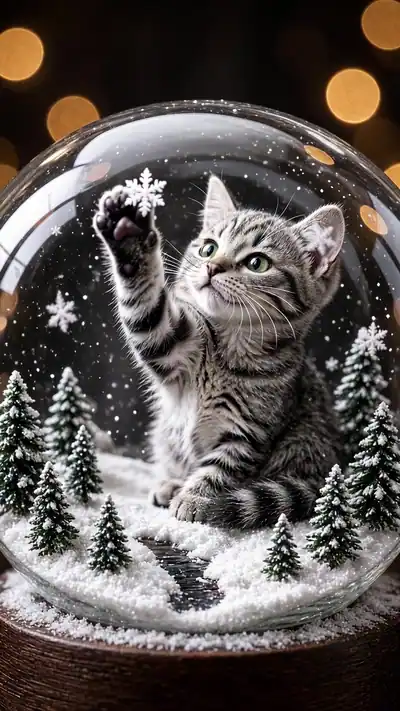
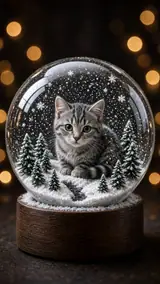
Each example pairs the starting photo with its finished clip. In Me in a Snow Globe, a woman in a red scarf stands in a tiny wintry forest with a lit cabin, smiles and waves while the camera pushes in and circles the glass. In Couple Snow Globe, an adult couple in winter coats hold hands and turn slowly together. In Pet Snow Globe, a grey tabby cat looks up at the falling flakes and paws at one.
Watch the samples, see your price, then pay. No subscription. Pricing from $1.42 per video. A failed or blocked video returns its credits automatically. Unused credits can be refunded within 14 days.
Who runs Effect Farm
Run by Effect Farm Team, an independent online service.
Payments by Stripe and PayPal. You can pay as a guest.
Every paid video: 1 remake within 7 days, any reason. Refund policy
Updated
More about Snow Globe
What is the Snow Globe trend?
Snow globe photos and filters come back every December. AI video tools now place a person or a pet inside a moving glass globe from one photo. Effect Farm is independent and is not an official holiday app.
A snow globe is a small keepsake: a tiny world under glass that you shake to make it snow. Seeing yourself, your partner or your cat inside one, with flakes swirling and the camera moving around the glass, turns a photo into a short holiday card.
Add one clear photo of one adult, of an adult couple standing side by side, or of your pet. Faces should be visible and well lit. You do not write a prompt.
Photo needed: One photo of one adult, an adult couple or your pet
2. Pick a version and pay
Choose Me in a Snow Globe, Couple Snow Globe or Pet Snow Globe. Check the example and see the price before generation. You must be 18 or older to buy. Pay for one video as a guest.
3. Wait for the email link
The AI builds your 10-second snow globe video in a few minutes. You can close the page; the private link arrives by email. Open it and download the MP4.
One photo of one adult, an adult couple or your pet
Only upload photos of adults (18 or older) or pets. Do not upload a photo of a person under 18. Use a sharp, well-lit image where the person, both adults, or the pet is easy to see. For Couple Snow Globe, both adults should be in the same photo and agree to be in the video.
Use JPG, PNG, WebP, HEIC, up to 30 MB. Photos are resized before upload. You can swap the picture before you start. You must be 18 or older. Confirm photo rights, adult age and consent, and pet ownership. We delete uploads after 7 days and never use them to train models.
You get
MP4, 720p, 9:16, 10 s. Model-generated sound.
Each AI Snow Globe video is 720p, 9:16, with generated audio, as a downloadable MP4 of 10 seconds. The glass dome, the tiny winter scene, the falling flakes and the camera move come from the effect; your photo supplies the person, the couple or the pet inside it.
This effect uses 30 credits for one video. Pack pricing starts from $1.42 per video. Pack credits never expire. Compare packs before buying more credits.
Photo tips for a better Snow Globe video
A good input makes the subject easier to read. Open the photo at its original size and check the important details before uploading. A bright, sharp photo is more useful than a heavily edited one. Match the crop to the effect: a face-focused scene and a routine with full-body steps need different framing.
Show the whole body, or at least from the waist up, so the figure fits under the glass.
Face the camera in even light, without sunglasses or a mask.
For Couple Snow Globe, stand side by side with both faces clearly visible.
For Pet Snow Globe, use a sharp photo of one pet with its face and body in view.
Use a plain background; the scene replaces it.
What can go wrong with a Snow Globe AI video
Flakes outside the glass
The flakes are drawn by the model. In our Pet Snow Globe sample a few flakes appear outside the glass near the top. Play the example before you pay.
A small or blurry face
The figure inside the globe is small, so the model needs a clear face to keep the likeness. A side view, a dark photo or a small face in a group shot gives a weaker match.
Clothing can change a little
The model may add winter layers such as a scarf or a coat to fit the winter scene. In our samples the people keep their look and the couple keep holding hands.
A generation that fails returns its credits automatically. Not happy with a delivered video? It includes 1 remake within 7 days, or write to support@effectfarm.com.
From one photo to a snow globe
Upload one photo of yourself, an adult couple, or your pet, then complete a paid order. Guest checkout is available. When the video is ready, a private email link has your 10-second MP4.
Snow Globe AI video ideas
Use these as starting points for your photo and for the finished clip. They are ways to use the effect, not extra controls. The template sets the movement.
A video Christmas card
Send Me in a Snow Globe instead of a printed card: a short clip of you waving from inside the glass, ready for a chat, an email or a story.
An anniversary or first-Christmas surprise
Couple Snow Globe puts the two of you hand in hand inside a tiny snowy village. Use one photo where you stand side by side.
A keepsake of your pet
Pet Snow Globe shows your cat or dog under the glass, looking up at the snow. Pair it with an elf dance of the same pet for a full holiday set.
You can watch the samples and see your price before you pay, with no sign-up. Each video you make is paid: one video costs $9.99. Pack credits never expire.
Do I need to sign up?
No. Pay as a guest with card or PayPal. Upload without an account and see the price before generation. Your payment provider collects your email. Sign-in is optional. Keep your private order and wallet links to return to your videos and credits.
What if my video fails? Can I get a refund?
A failed video returns its credits to your wallet automatically. This is a credit return, not an automatic cash refund. For unused-credit refunds, email support@effectfarm.com from your checkout email within 14 days of purchase.
What format is the AI Snow Globe video?
A 10-second, 720p, 9:16 MP4 with generated sound, on a private email link.
How do I follow the AI Snow Globe tutorial?
Upload one clear photo, pick Me in a Snow Globe, Couple Snow Globe or Pet Snow Globe, and pay for one video. Then follow the three steps below the tool. The clip is usually ready in 3–6 minutes.
Why is AI Snow Globe on TikTok?
Snow globe photos and filters return every December, and people post them as holiday greetings. The source section links to the TikTok tag page for snow globe clips.
Where can I see the original AI Snow Globe video?
There is no single original clip. The examples on this page show the three versions we generate, and the source section links to the TikTok tag page.
What happens in the AI Snow Globe meme?
A person, a couple or a pet appears inside a glass snow globe. Flakes swirl around them, they wave, turn or look up, and the camera moves slowly around the glass.
Do I need an account?
No. Guest checkout is available; sign-in is optional. Every generation is paid, including the first.
Can I upload a photo of a couple or a pet?
Yes. One adult, a couple of two adults, or a pet. Photos of a person under 18 are not allowed.
What happens to my photo?
Uploaded photos are deleted within 7 days and are never used to train AI models. Your generated videos are accessible only through private links and are kept until you delete them or ask us to delete your data.
Is this a photo or a video?
A 10-second video. Flakes fall, the camera moves around the glass, and the person or pet inside moves a little.
Who can I contact for order support?
support@effectfarm.com.
More effects
Compare the sample, photo requirements and output before choosing another effect.